Bridge Service#
Introduction#
The Bridge Service decodes a raw stream of quads from an ATLAS Data Server (ADS), converting the data to engineering values then into the Stream Protocol via the Stream API. It includes components to manage sessions, configuration, metadata etc. All RDA protected data will be filtered out at this point, based on the active team license, so any downstream components will only receive data available to the team.
Choose your deployment#
Bridge Service is the same program in every deployment. What changes is how it is started, and therefore which configuration file it reads.
| How Bridge Service runs | Configuration file it reads |
|---|---|
| Launched by ADS (installed with ADS) | Documents\McLaren Electronic Systems\ATLAS 9\BridgeService\BridgeServiceConfig.json |
Standalone on Windows (you run MA.DataPlatforms.Bridge.Host.exe yourself) |
Configs\AppConfig.json next to the exe, or the file you pass with -c |
Docker (atlasplatformdocker/bridge-service-host) |
/app/Configs/AppConfig.json in the container, or the file named by the CONFIG_FILE_PATH environment variable |
BridgeServiceConfig.json and AppConfig.json have the same format and accept the same sections, described in the
Configuration Guide.
On first launch, ADS copies the default AppConfig.json from <ADS install folder>\BridgeService\Configs\ to
Documents\McLaren Electronic Systems\ATLAS 9\BridgeService\BridgeServiceConfig.json. From then on, ADS always
starts Bridge Service with that copy.
- Edit
BridgeServiceConfig.json, not theAppConfig.jsonin the install folder. Once the copy exists, changes to the install-folder file have no effect. - To start again from the default file (for example after upgrading ADS), delete
BridgeServiceConfig.json. ADS creates a new copy the next time it launches Bridge Service. - ADS passes its own feed port to Bridge Service, which overrides
BridgeConfig.FeedPortin the file. - If
EssentialsConfigandRdaConfigpaths are left empty, Bridge Service uses the config, PGV and PUL folders set in ATLAS 9 for the Windows user running it.
Bridge service uses the name of the ADS as the DataSource name. This can be configured within the ADS on Setup | General | General Network Settings | Name.
Run MA.DataPlatforms.Bridge.Host.exe. It accepts three optional command-line arguments:
| Argument | Meaning | Example |
|---|---|---|
-c |
Configuration file path | -c "C:\Bridge\MyConfig.json" |
-l |
Log file path (see Logging) | -l "C:\Logs\bridge.txt" |
-p |
Feed port that ADS connects to | -p 9697 |
Use an absolute -c path, or start from the install folder
A relative configuration path is resolved from the folder Bridge Service is started from. If you start it from
anywhere else, pass an absolute path with -c.
As with ADS, empty EssentialsConfig and RdaConfig paths fall back to the config, PGV and PUL folders set in
ATLAS 9 for the Windows user running Bridge Service.
The image runs from /app and reads /app/Configs/AppConfig.json. Either mount your own file over it, or mount it
anywhere and set CONFIG_FILE_PATH to its absolute path inside the container.
docker run -p 9697:9697 -p 10011:10011 -v /srv/bridge/AppConfig.json:/app/Configs/AppConfig.json:ro -v /srv/essentials:/essentials:ro atlasplatformdocker/bridge-service-host
Settings you must change for Docker
EssentialsConfig.CfgDirectoryPathsandPgvDirectoryPathsare required. There is no ATLAS 9 fallback in a container: if either is empty, Bridge Service stops at startup with "DirectoryPaths needs to be specified in EssentialsConfig". List the folders as they appear inside the container. If you use PUL files, setRdaConfig.PulFilesSearchPathsthe same way.StreamApiConfig.BrokerUrl:localhostrefers to the container itself. Point it at your Kafka broker's host name.- Ports: publish the feed port (default
9697) that ADS connects to, and the Prometheus metrics port (10011in the default configuration file).
Any setting can also be overridden with an
environment variable, for example
-e StreamApiConfig__BrokerUrl=kafka:9092.
Splitting data across Kafka topics or partitions#
The data can be split across multiple Kafka topics or partitions. For more information, refer to Stream Creation Strategy. The examples below show only the two relevant sections.
Add or update — don't replace the whole file
Change these sections in your existing configuration file and leave the other sections in place.
| BridgeServiceConfig.json | |
|---|---|
1 2 3 4 5 6 7 8 9 10 11 12 13 14 15 16 | |
| BridgeServiceConfig.json | |
|---|---|
1 2 3 4 5 6 7 8 9 10 11 12 13 14 15 16 17 18 19 20 21 22 23 24 25 26 27 28 29 30 31 32 33 34 35 36 37 38 39 40 41 42 43 44 45 46 47 48 49 50 51 52 53 54 55 56 57 58 59 60 61 62 63 64 65 66 67 68 69 70 71 72 73 74 75 76 77 78 79 80 81 82 83 84 85 86 87 88 | |
Logs
From Bridge Service 2.1.1, the default configuration file logs to the console window only, so no log file is written unless you configure one. See Logging.
Setup#
Prerequisite:
Kafka broker - The Bridge service needs to be configured to write to a Kafka broker. As you can see in the above example, the config file points to a broker url, which is hosting kafka locally on the same machine as the ADS.
To enable the Bridge Service, set "Enable remote data feed" setting to "True" in ADS | Tools | Options | Recording tab | General
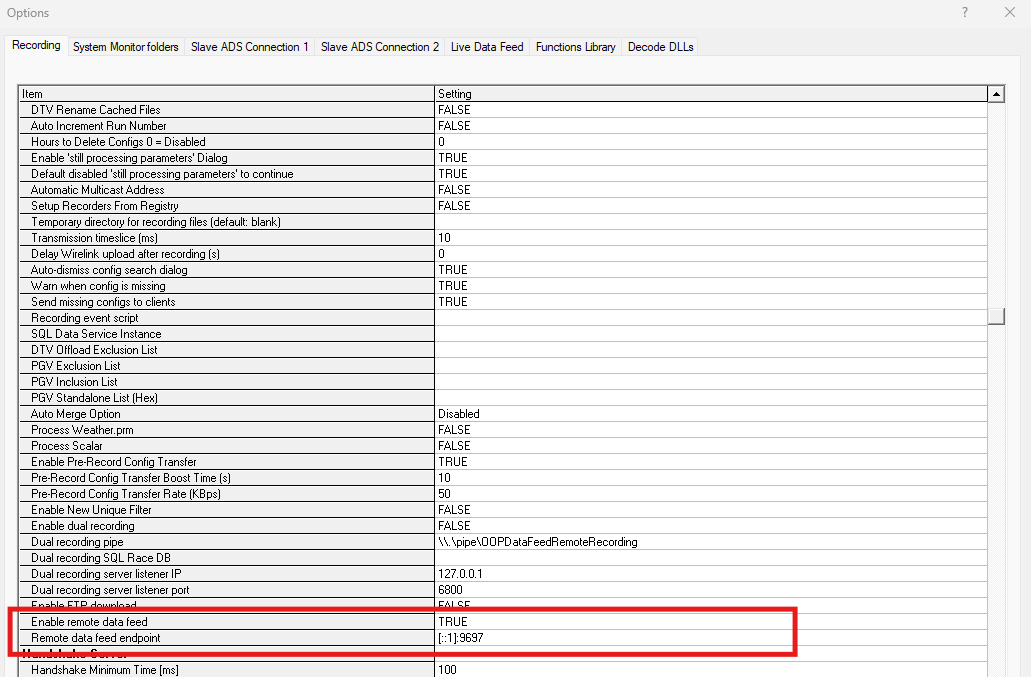
Restart ADS once the setting is applied.
Once the data is published on Kafka, users can use the Stream API to consume the data. For more information, please refer to the Stream API Sample code
Note
Currently, ADS will launch the Bridge Service in a separate command prompt for ease of testing/validation and diagnostics.
UNIX Timestamps#
Timestamps from Motion Applied ECUs are relative to midnight local time. To convert the timestamps to UNIX epoch time in UTC, the date and the local timezone offset on the machine hosting the bridge service is used.
Warning
It also applies to File Telemetry Recorders and Multi-Session Offload Recorders in addition to live telemetry. Replaying a raw file on a machine that is incorrectly configured could publish timestamps at the incorrect date and timezone.